SDA Operations Platform

One platform for
SDA operations.

Manage participants, properties, claims, compliance, risk, and rent contributions — purpose-built for Australian SDA providers.

11
Integrated modules
9
Configurable roles
NDIS
Q&S compliant
AU
Data & hosting
app.dwellpoint.au/dashboard
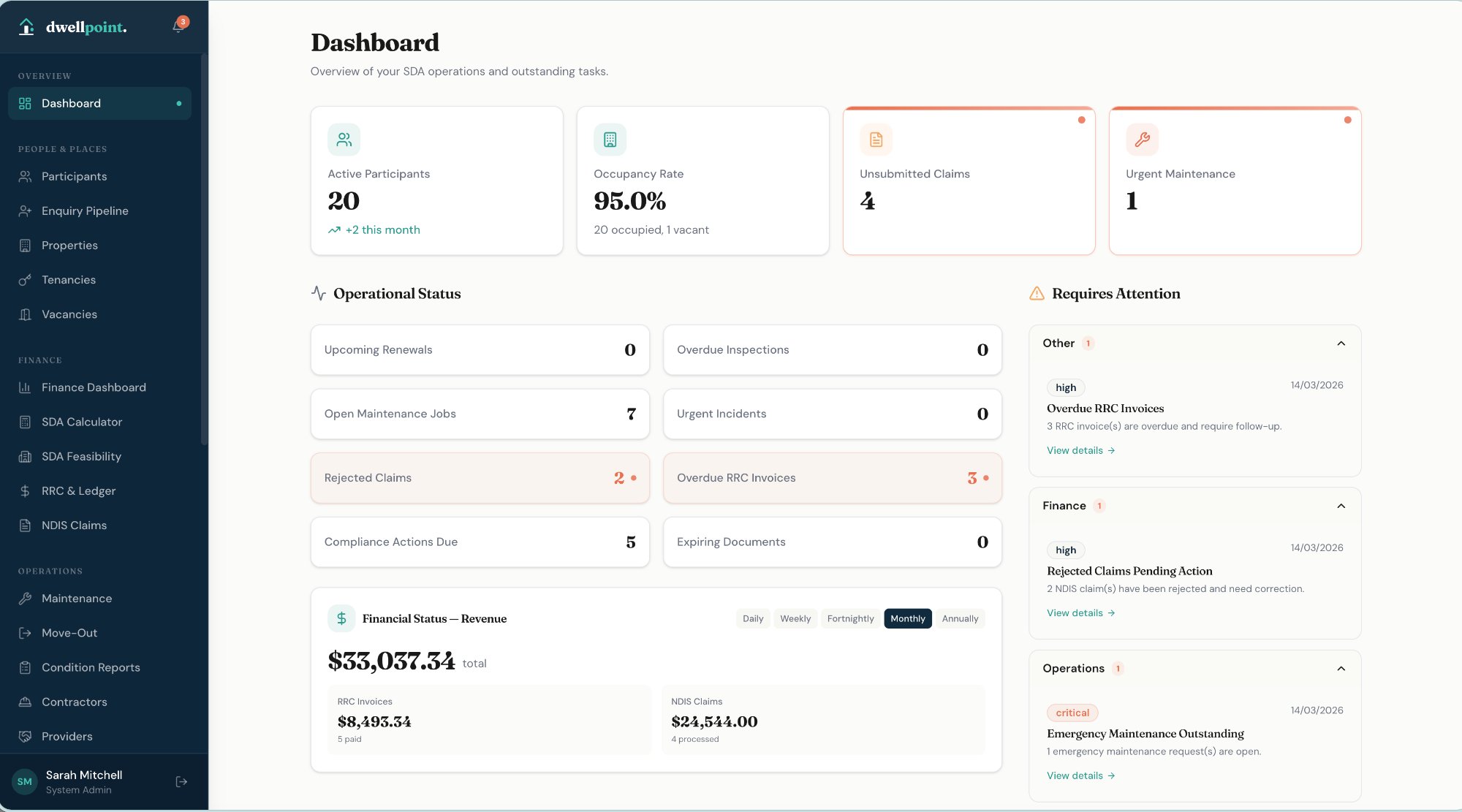
dwellpoint Dashboard
11 Modules
ParticipantsProperty & TenanciesRRC & LedgersNDIS ClaimsMaintenanceComplianceIncident ManagementRisk AssessmentSDA CalculatorProvidersReporting
Why dwellpoint.

SDA management, simplified.

SDA providers today manage some of the most complex housing operations in Australia using disconnected tools. dwellpoint. replaces that fragmented landscape with one purpose-built platform.

01
Operational Clarity
One source of truth across participants, tenancies, properties, claims, and compliance. No more switching between disconnected systems.
02
Financial Confidence
RRC calculations, NDIS claim preparation, arrears tracking, and payment management with full audit trails and proper approval workflows.
03
Compliance by Design
Document expiry tracking, inspection schedules, incident registers, and corrective actions built into daily operations — not bolted on.
04
Human-Centred Workflows
Clean interfaces, clear language, mobile-ready access, and workflows that match how SDA teams actually operate.
The Platform

Everything SDA providers need,
in a single system.

dwellpoint. is an integrated operations platform purpose-built for NDIS SDA providers — from participant onboarding through to NDIS claims, maintenance, and compliance.

Participants

Full participant lifecycle, from enquiry to exit.

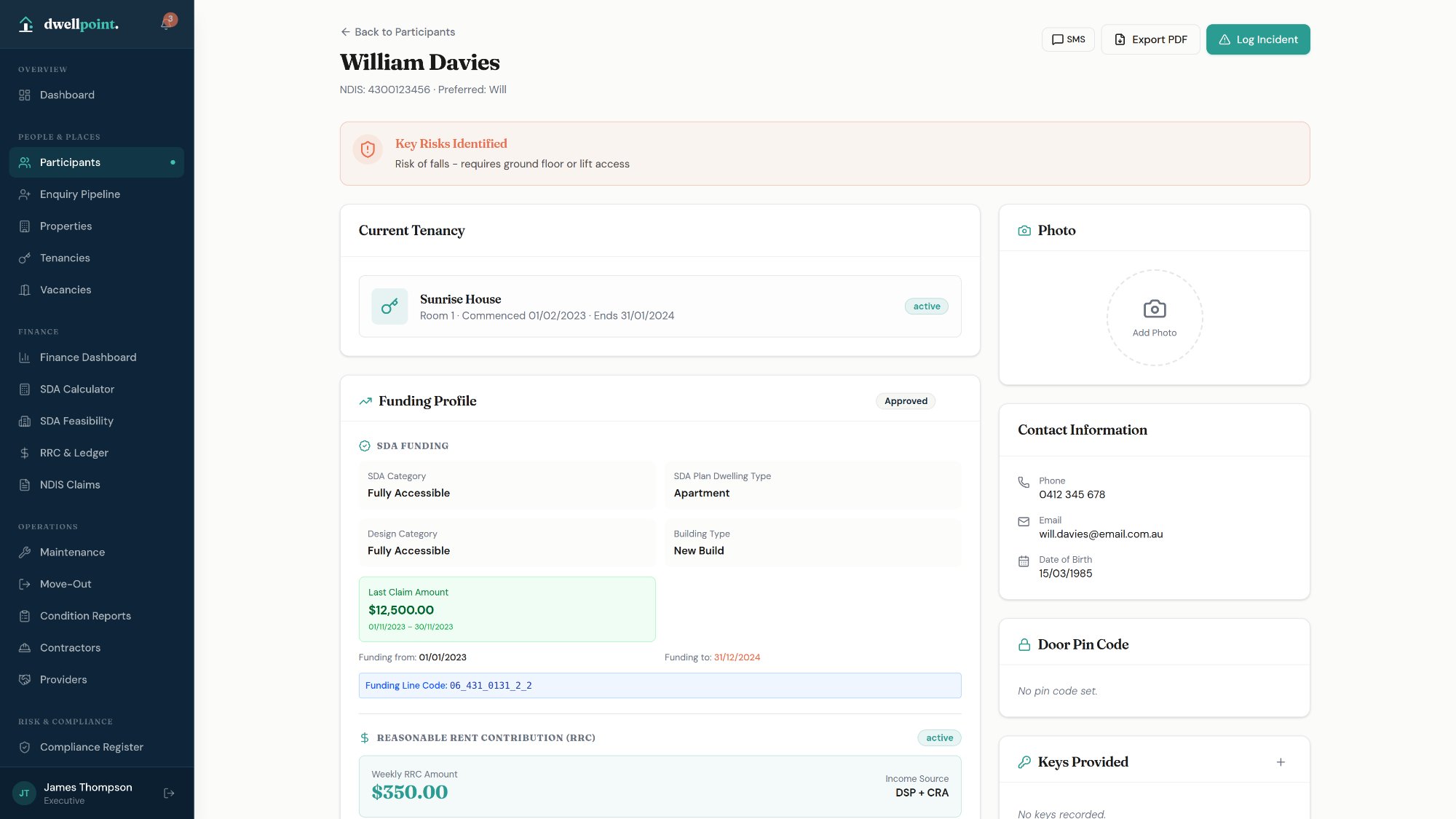
Complete NDIS participant profiles — funding details, SDA category, tenancy, support network, and NDIS documentation — managed in one place.

  • NDIS Funding Profile with SDA category, design category, and auto-calculated rate breakdowns
  • Kanban enquiry pipeline from New through to Accepted
  • Service agreements, onboarding checklists, and key management
  • Fortnightly revenue summary combining SDA Claim and RRC amounts
  • PDF participant summary export
Participant detail
Enquiry Pipeline

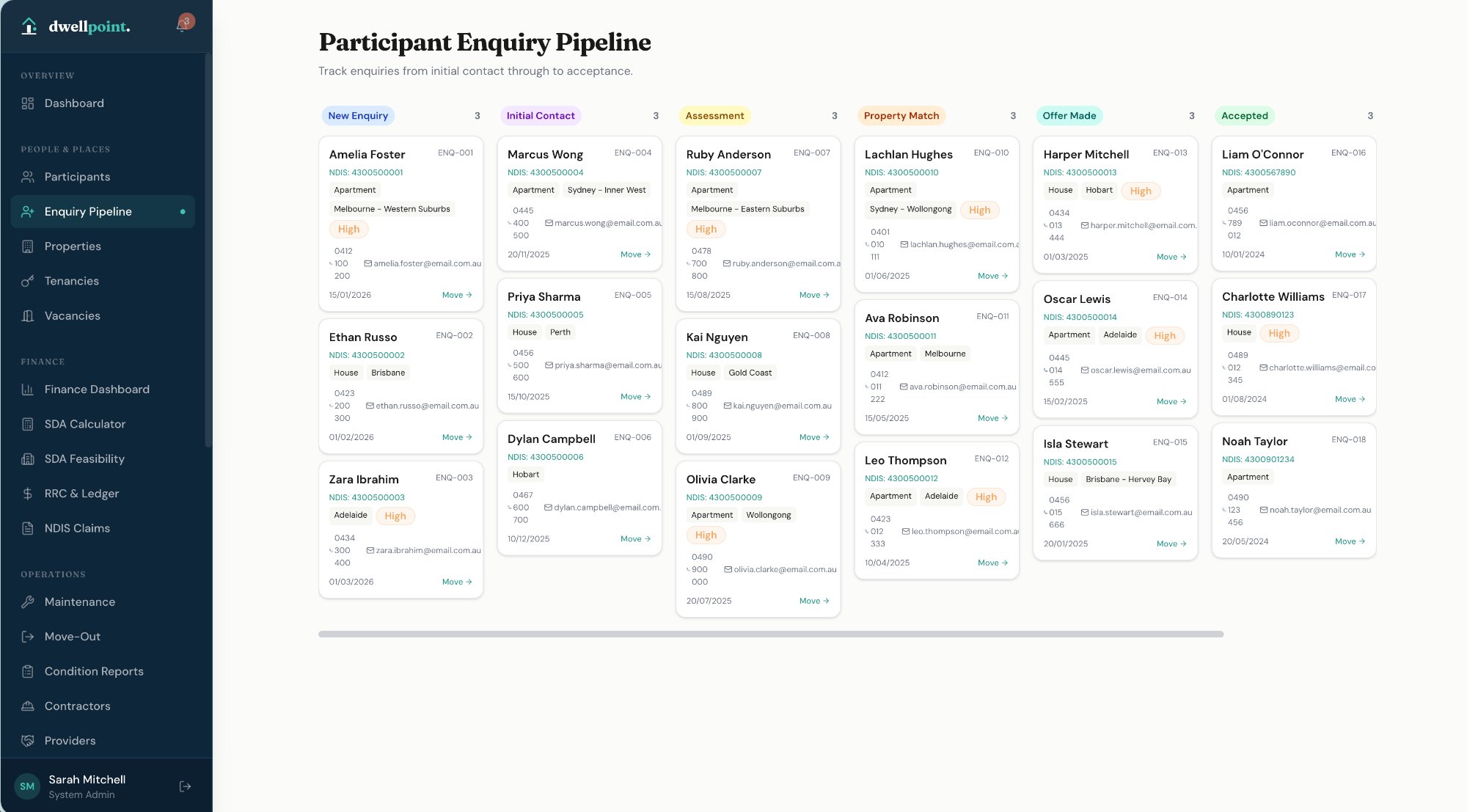
Track every enquiry from first contact to placement.

A Kanban-style pipeline keeps your team across all active participant enquiries — with clear stage visibility and inline management at every step.

  • Five-stage pipeline: New → Contacted → Assessment → Offered → Accepted
  • Enquiry cards with participant details, stage, and assigned contact
  • Direct link to full participant profile from each enquiry card
Enquiry pipeline
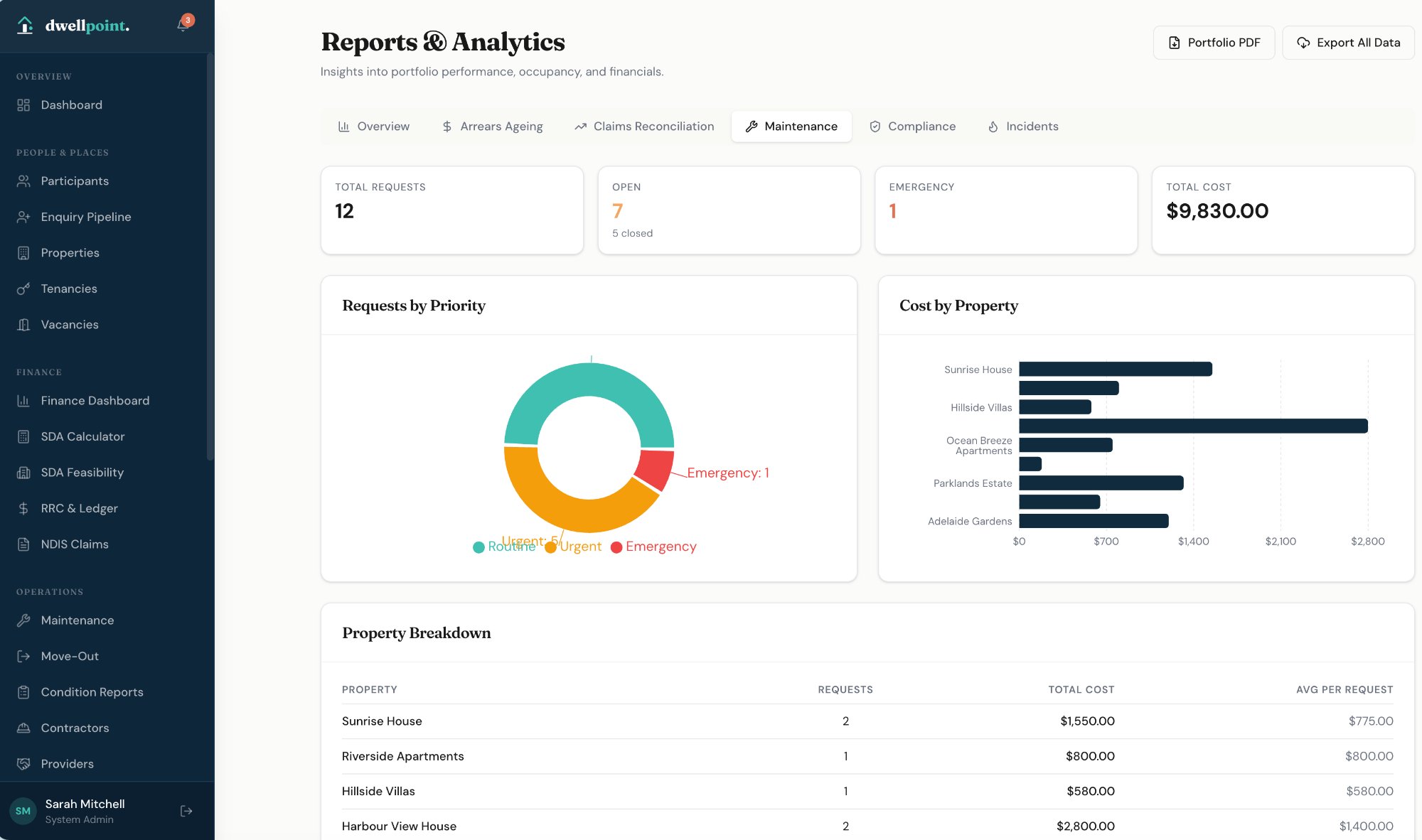
Maintenance

Maintenance requests managed end-to-end, with SLA tracking.

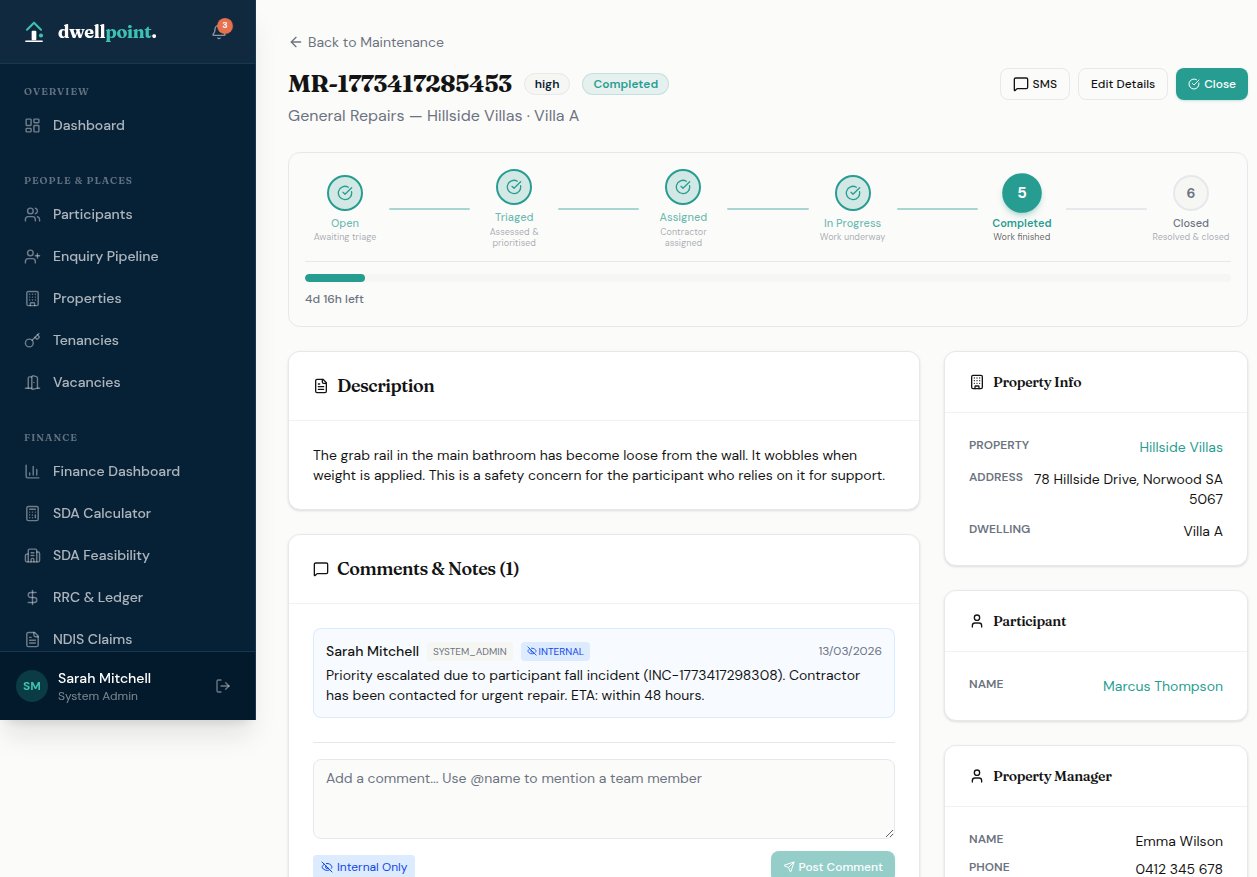
Log, triage, assign, and close maintenance requests across your portfolio — with contractor coordination, cost tracking, and SLA monitoring built in.

  • Six-step workflow: Open → Triaged → Assigned → In Progress → Completed → Closed
  • Priority levels with automated 4-hour emergency SLA alerts
  • Contractor assignment with direct SMS notifications
  • Estimated vs actual cost tracking per request
  • Participant impact tracking and dwelling maintenance history
Maintenance detail
Maintenance

Work orders generated and dispatched instantly.

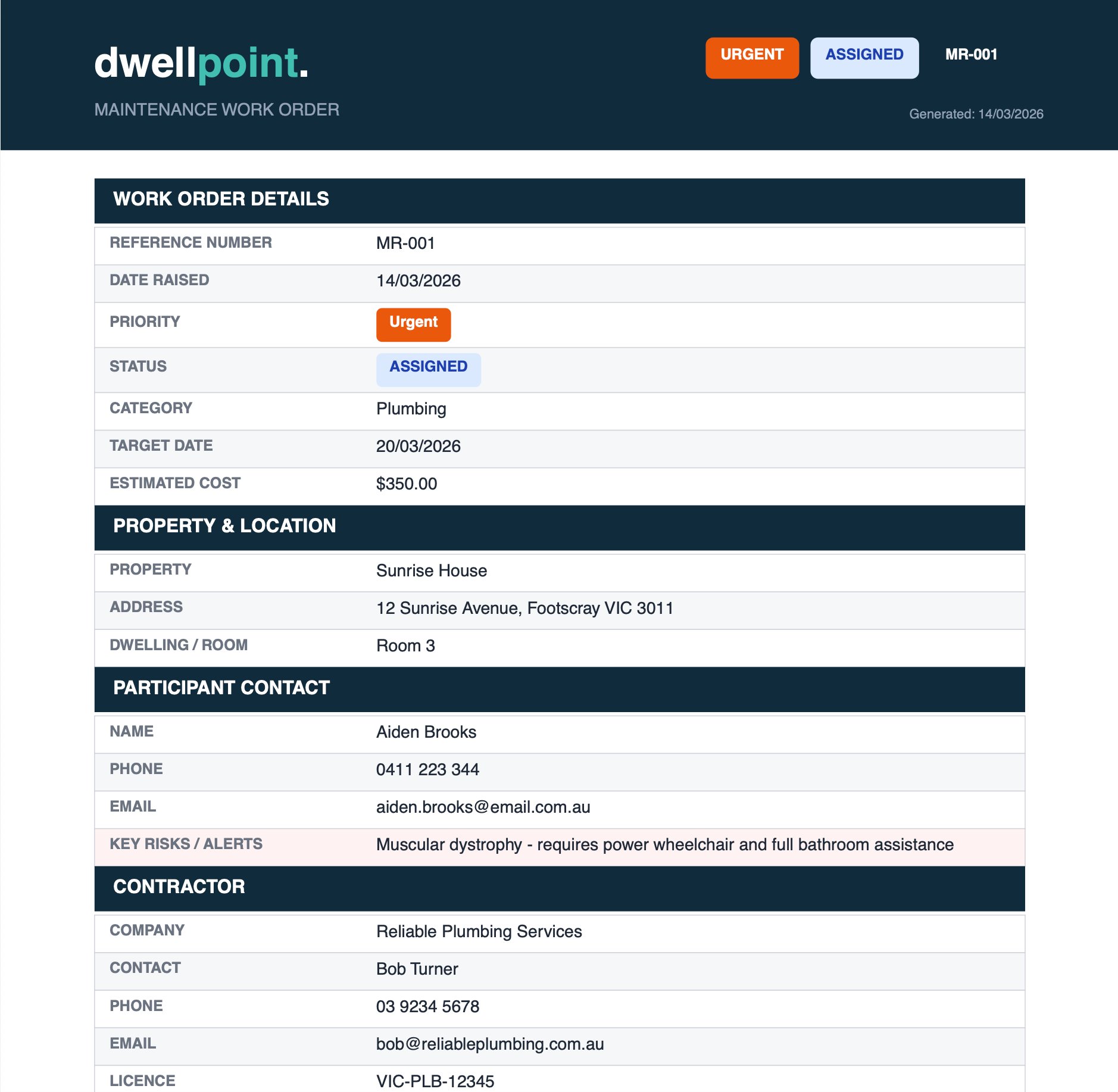
Every assigned maintenance request generates a branded work order PDF — complete with property details, participant contact, key risk alerts, contractor information, and a digital completion sign-off. Automatically distributed to all stakeholders the moment a contractor is assigned.

  • Branded PDF work order with all job, property, and contractor details
  • Participant key risks and access requirements surfaced on every order
  • Auto-send to contractor, property manager, and support coordinator on assignment
  • Contractors submit completion evidence from any device — no login required
  • QR code and hyperlink on every order for frictionless mobile sign-off
  • Digital sign-off captured and stored against the maintenance record
MR-001 — Maintenance Work Order.pdf 2 pages
Maintenance Work Order
Properties & Dwellings

Every property, every dwelling,
every document — in one place.

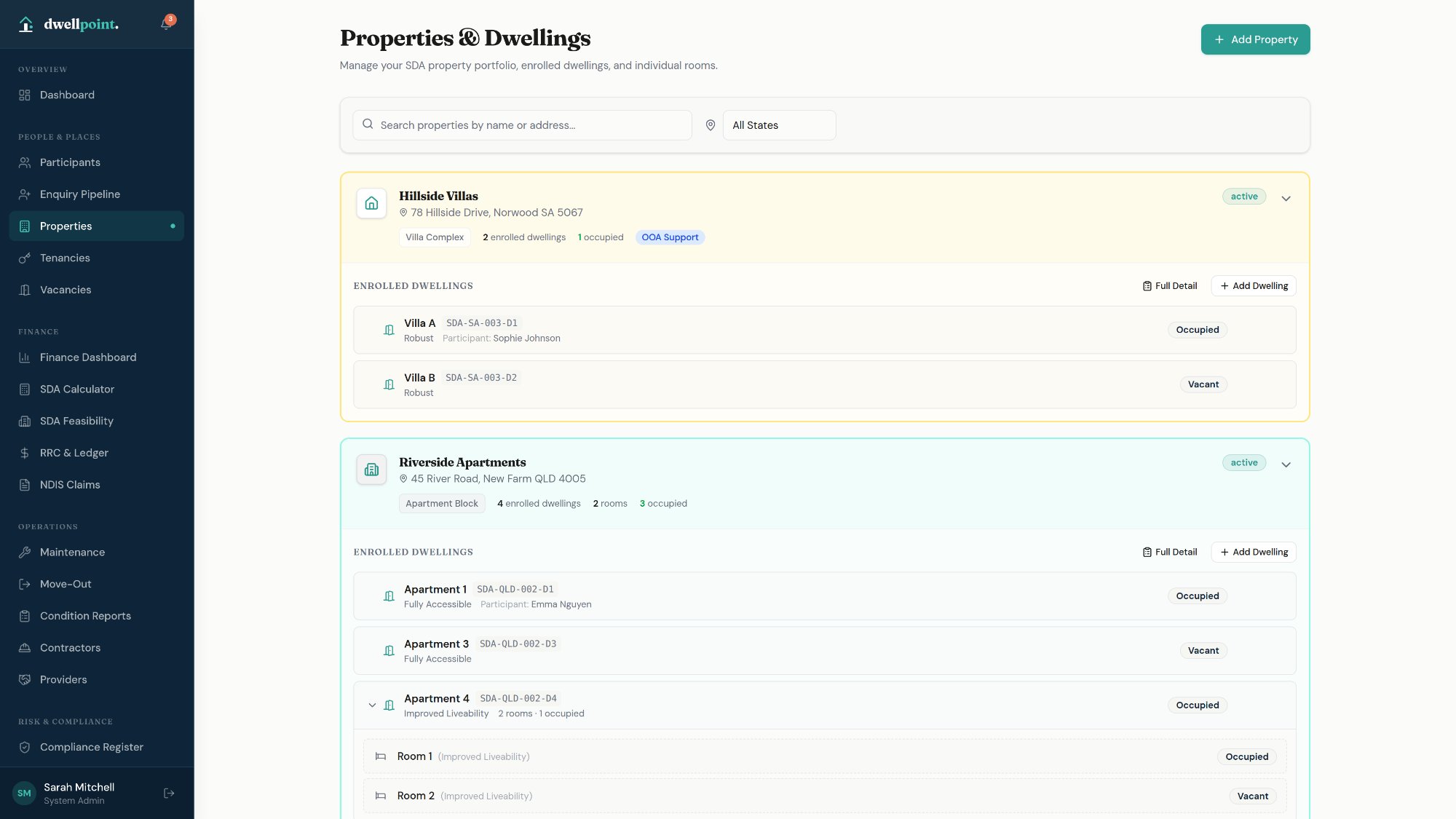
Manage your entire SDA property portfolio with enrolled dwelling registers, compliance documentation, insurance tracking, and property-level reporting — all linked directly to participants and tenancies.

Property Management

Group multiple enrolled dwellings under a single property record.

Each property holds its full operational picture — ownership details, insurance, location, SDA enrolment references, and all compliance paperwork — with individual dwelling records nested underneath.

  • Property register with address, SDA enrolment reference, and design category
  • Multi-dwelling support — apartments, villas, rooms, and group homes under one property
  • Dwelling-level detail: occupant, bedroom count, enrolment status, and maintenance history
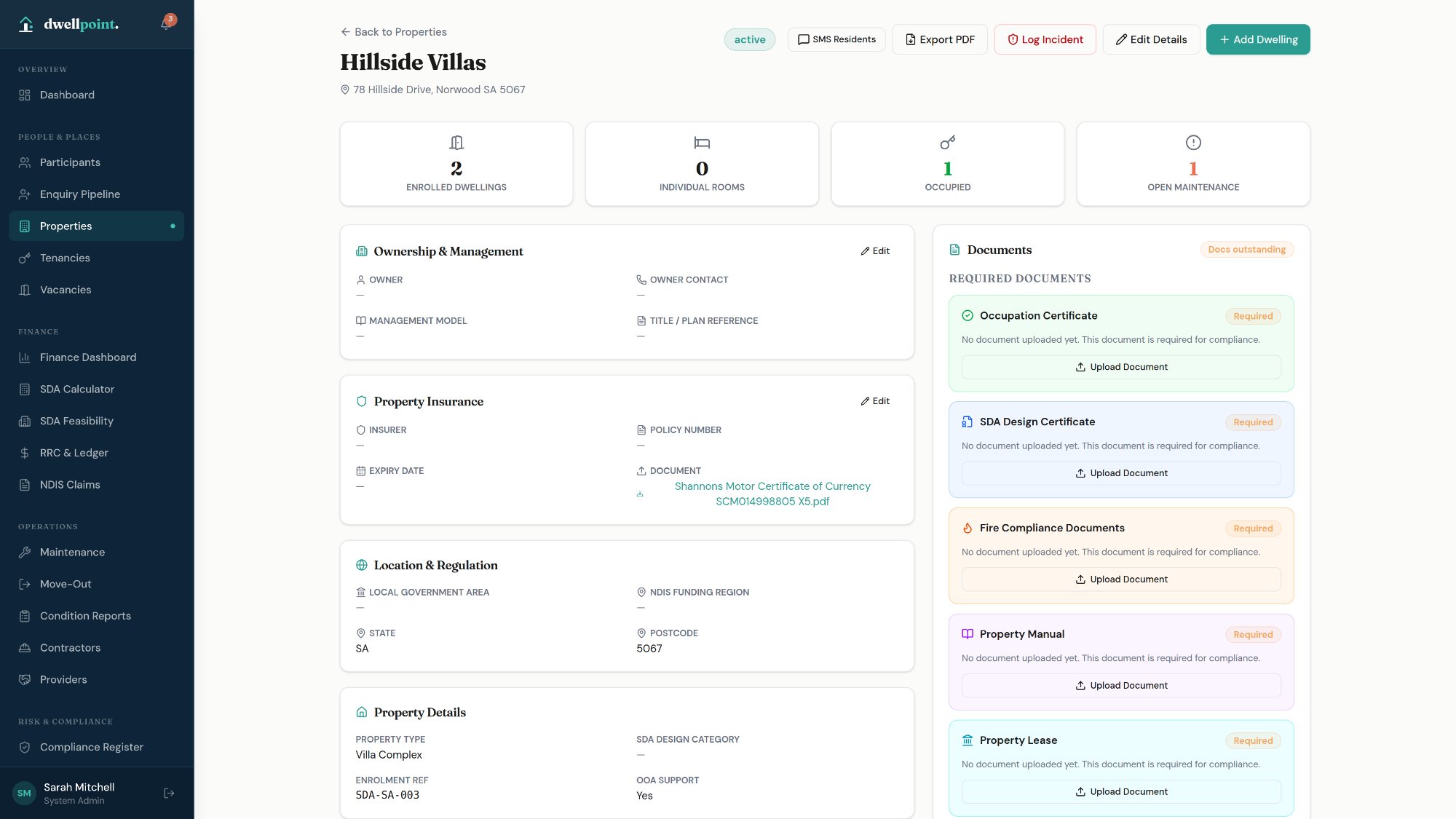
  • Ownership & management model with owner contact and title reference
  • Property insurance tracking with policy number, expiry date, and document upload
  • Location & regulation fields: LGA, NDIS Funding Region, state, and postcode
  • OOA support flag and SDA design category per property
  • Occupancy, enrolled dwellings, and open maintenance count at a glance
Properties list
Compliance Paperwork

All required property documents tracked and flagged automatically.

Required compliance documents are tracked per property with clear outstanding alerts — so nothing expires unnoticed and audits stay straightforward.

Occupation Certificate
SDA Design Certificate
Fire Compliance Documents
Property Manual
Property Lease
Insurance Certificate
Property detail
Finance & Claims

NDIS claims and RRC ledgers,
ready to submit.

dwellpoint. handles the full financial cycle — from RRC invoice generation through to NDIS claim submission and payment reconciliation.

NDIS Claims

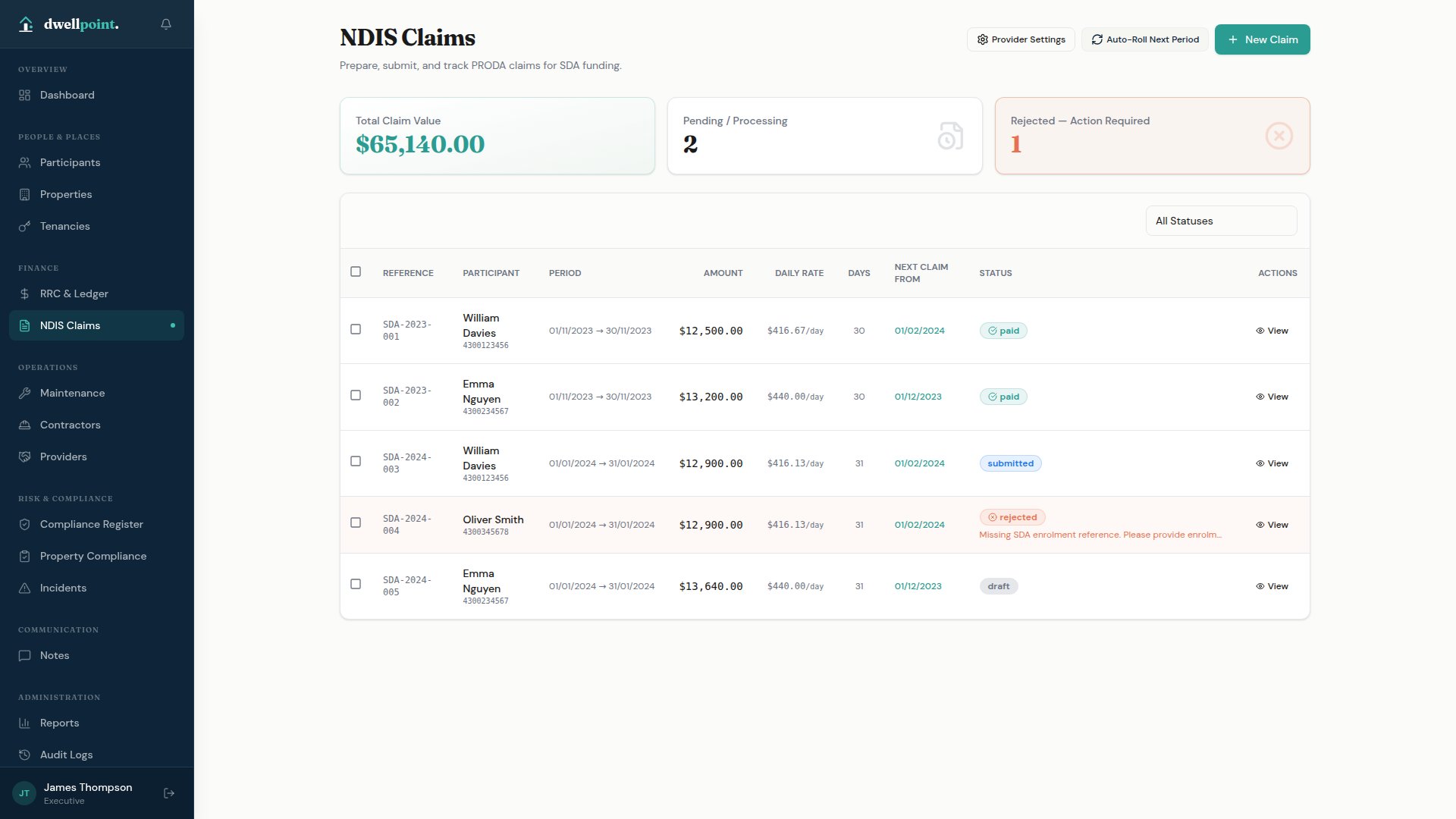
Prepare, validate, and track SDA claims.

Claim preparation with auto-populated support item numbers, daily rate calculations from enrolled benchmark amounts, and a full claim lifecycle from draft through to paid or rejected.

  • Support item number auto-population
  • Daily rate calculation from enrolled benchmark amounts, or participant's approved plan funding
  • Export upload-ready batch files for NDIA system lodgement
  • Batch claim operations with auto-roll to next period
  • Rejected claim tracking with action-required alerts
  • PRODA provider settings management
NDIS Claims
RRC & Ledgers

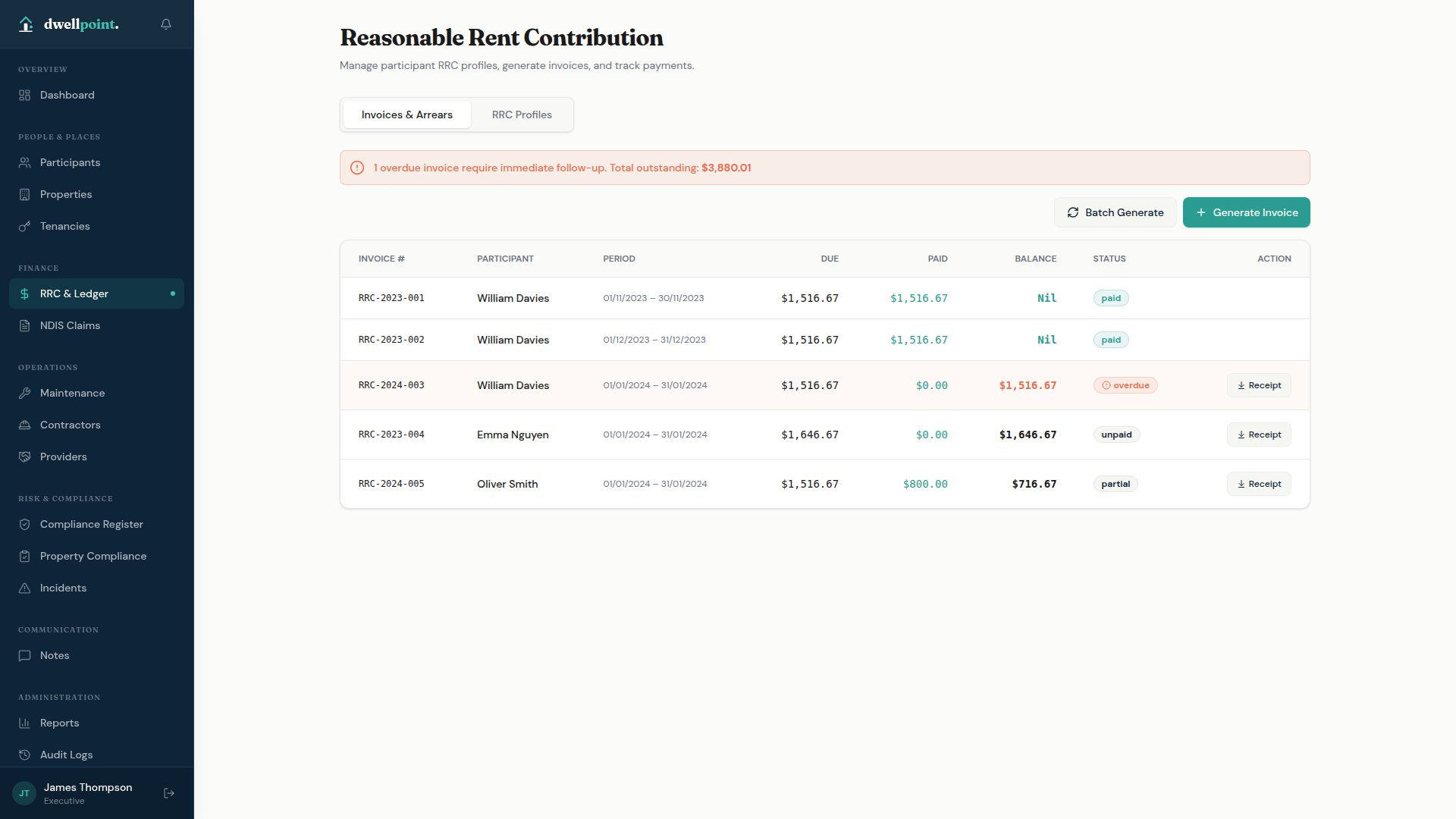
Reasonable Rent Contributions, calculated and invoiced automatically.

RRC profiles per participant with automatic fortnightly or monthly invoice generation, payment tracking, and arrears management — based on current DSP and Commonwealth Rent Assistance rates.

  • Weekly RRC amount calculation per participant
  • Automatic invoice generation with full status lifecycle
  • Batch invoice generation across all participants
  • Overdue alerts with total outstanding balance summaries
RRC Ledger
Risk & Compliance

Incident reporting and compliance
built to NDIS standards.

From NDIS Quality & Safeguards compliant incident reports through to property compliance registers and risk assessments — obligations structured and visible.

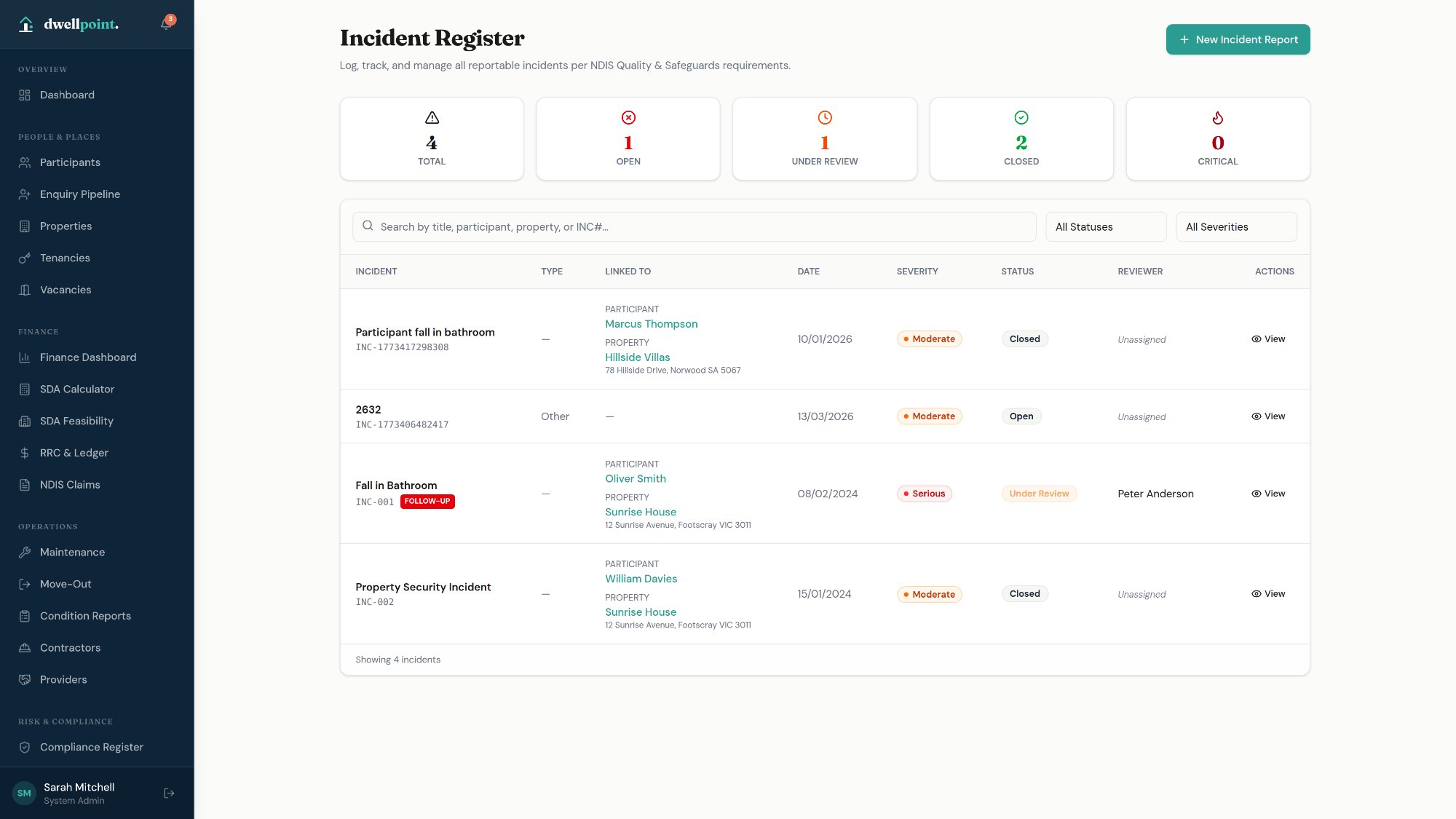
Incident Management

NDIS Q&S compliant incident reporting, end to end.

Structured incident reports following the NDIA framework — covering all eight required sections, with investigation workflow, completeness tracking, and PDF export.

  • Five-step workflow: Open → Under Review → Investigating → Resolved → Closed
  • Eight editable sections following the NDIA structure
  • NDIS Commission notification tracking with reference numbers
  • Severity levels: Minor, Moderate, Serious, Critical
  • Report completeness sidebar with 12-item checklist
  • PDF export in NDIA-compliant format
Incident register
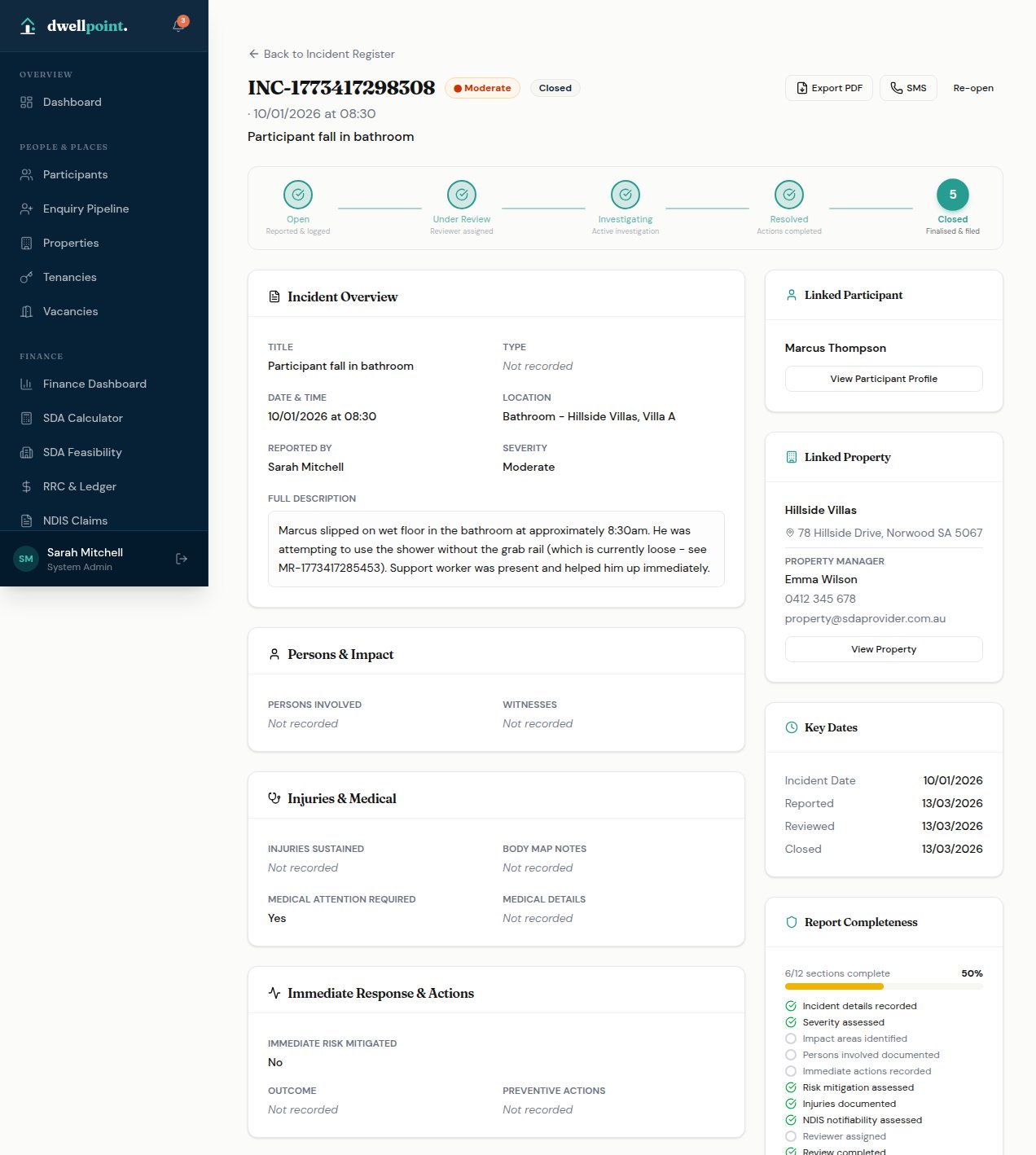
Incident Detail

Every section of the NDIA report structure, in one view.

The full incident detail page guides investigators through each required section — from persons involved and injuries through to NDIS Commission notification and corrective actions.

  • Incident overview: type, severity, date/time, location, and full description
  • Persons & impact, injuries & medical, and immediate response sections
  • Restrictive practices recording with type, duration, and authorisation
  • External notifications: agencies, family, police
  • Review & follow-up with corrective actions and next review date
  • Activity timeline with full audit trail of every change
Incident detail
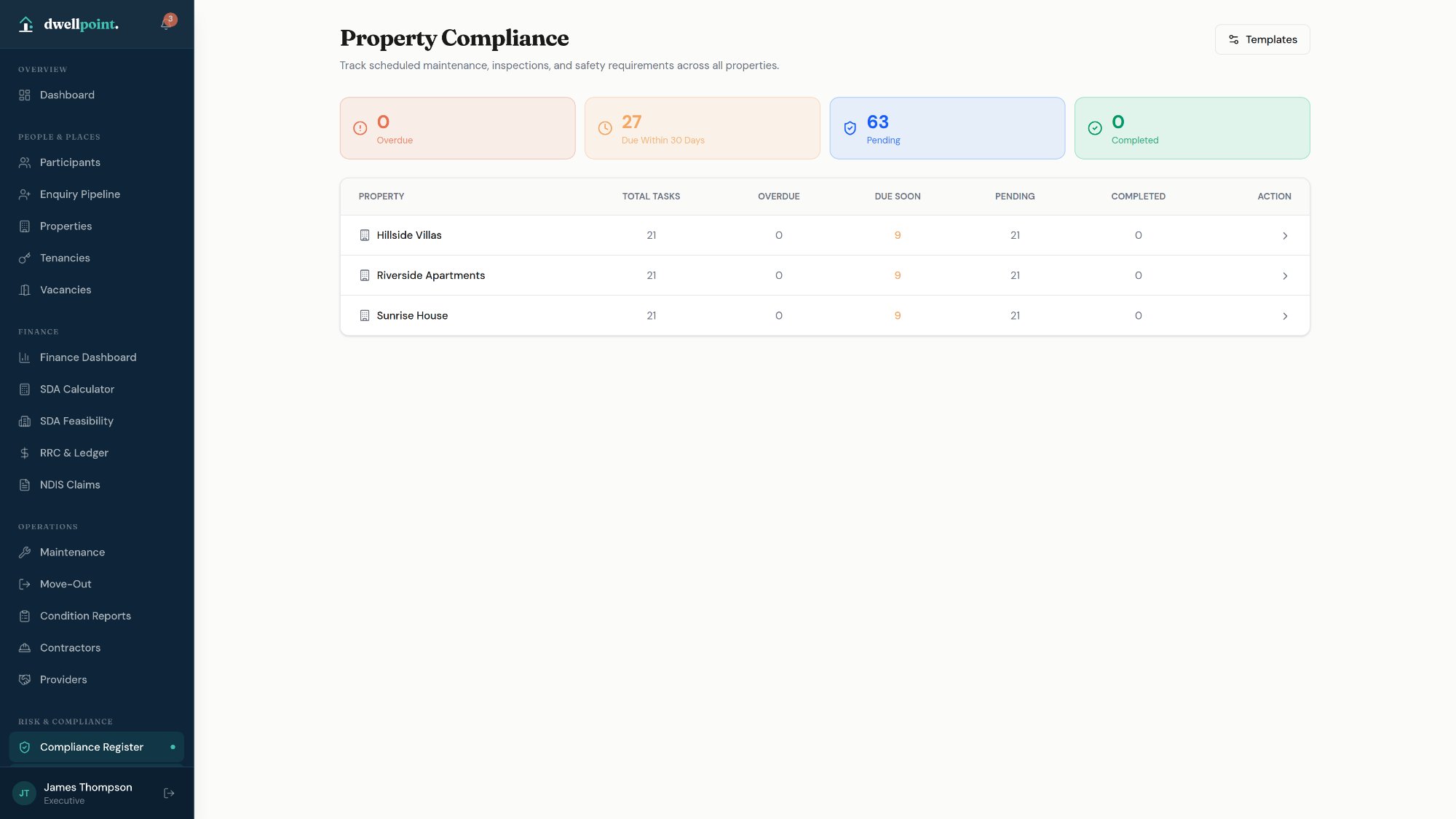
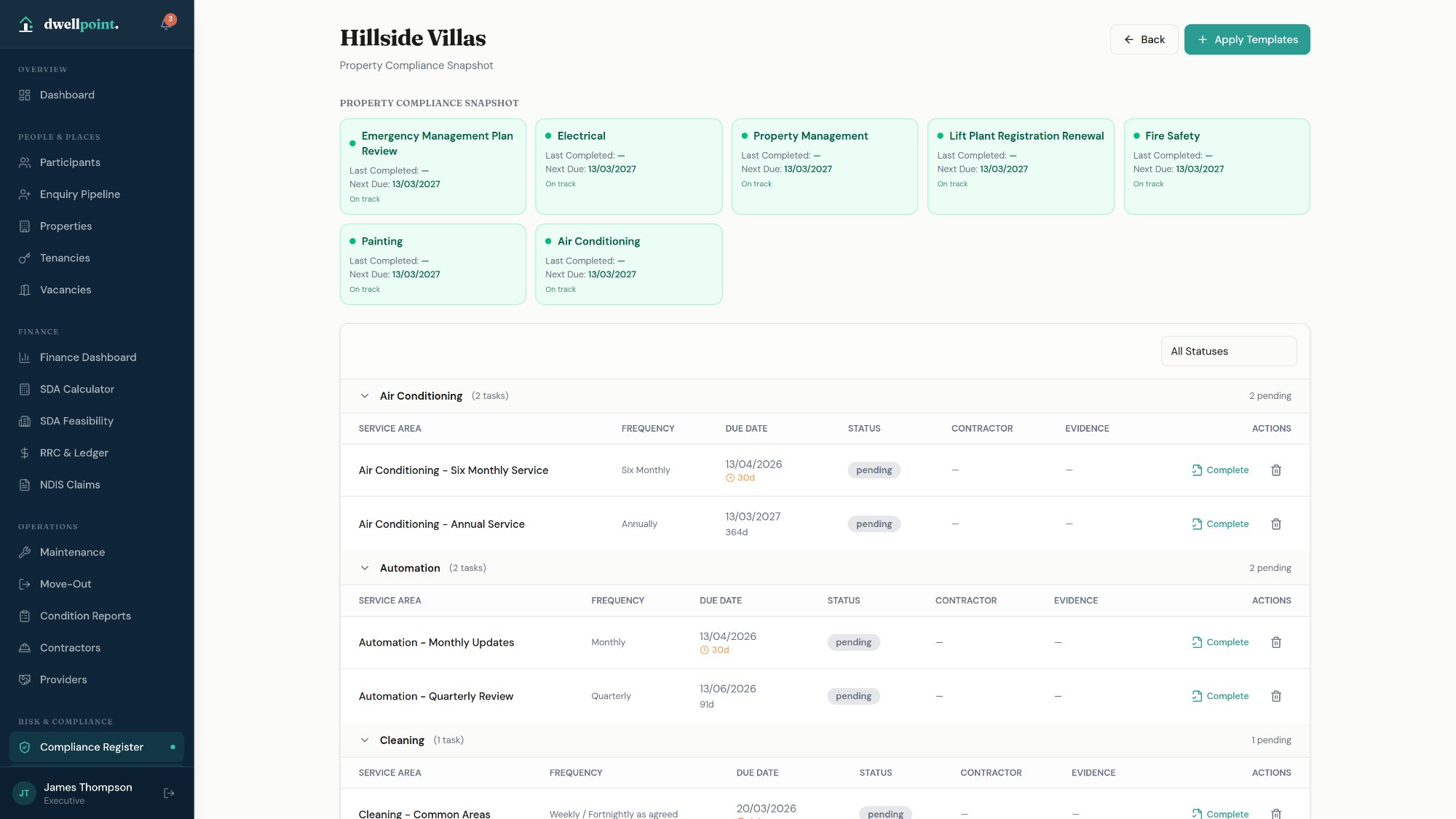
Compliance

Property compliance registers, scheduled and tracked.

Compliance task templates for fire safety, accessibility, and building standards — applied across properties with automatic due date scheduling, overdue tracking, and document expiry alerts.

  • Compliance register with task categories and service areas
  • Template-based task creation across properties
  • Upcoming, due, overdue, and completed status tracking
  • Document expiry alerts surfaced on the dashboard
  • Auto-suggested next due dates based on frequency
Compliance dashboardCompliance drilldown
Risk & Compliance

Participant risk assessment,
structured and actionable.

Per-participant risk registers with structured scoring, controls management, and incident-linked escalation — built for the complexity of SDA support environments.

Risk Assessment

Inherent and residual risk, scored and tracked.

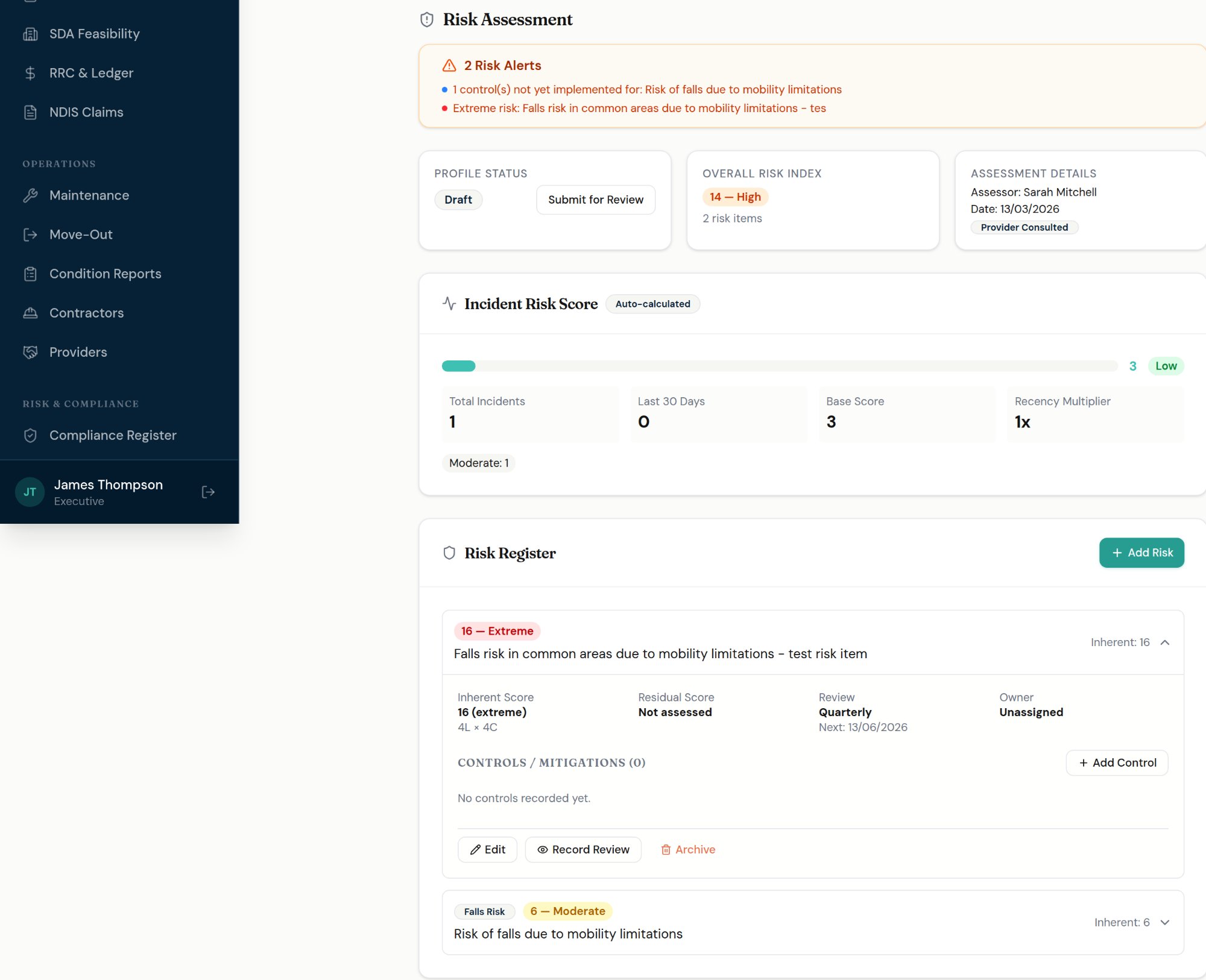
Each participant carries a structured risk register. Risks are scored using a 5×5 likelihood × consequence matrix — with both inherent risk (before controls) and residual risk (after controls) captured and visible side by side.

  • Per-participant Risk Register with inherent and residual scoring
  • Risk score auto-calculated from likelihood × consequence matrix
  • Incident Risk Score auto-updated from incident history and recency
  • Risk owner assignment with configurable review frequency
  • Controls and mitigations tracked against each risk item
  • Risk category and owner role classification per item
Participant Risk Assessment
Risk Controls

Add, score, and mitigate risks in one step.

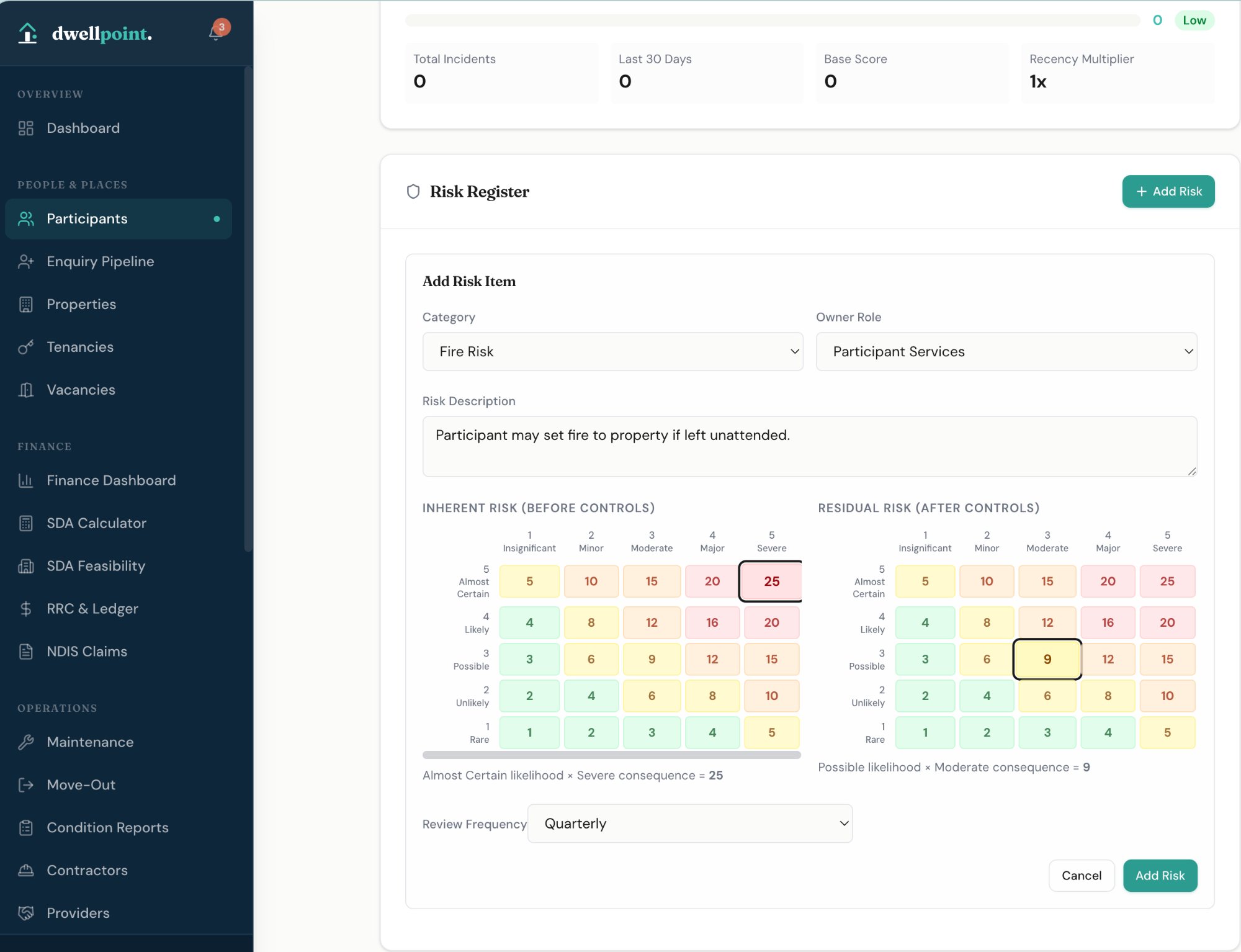
Each risk item captures category, description, inherent score, controls applied, and residual score in a single structured form — with dual 5×5 matrices showing the before and after picture clearly.

  • Side-by-side inherent vs residual risk matrices per item
  • Risk category selection (Fire Risk, Falls, Behaviour, and more)
  • Free-text risk description with owner role assignment
  • Review frequency scheduling: Weekly, Monthly, Quarterly, Annually
  • Visual score highlighting across the full 5×5 matrix
Risk Controls
SDA Calculator

Official NDIA 2025–26 SDA pricing,
built in.

Calculate accurate SDA funding rates across all enrolment types, building types, design categories, and SA4 location factors — with a full feasibility model for investment analysis.

SDA Calculator

Every variable. Every rate. Current NDIA pricing.

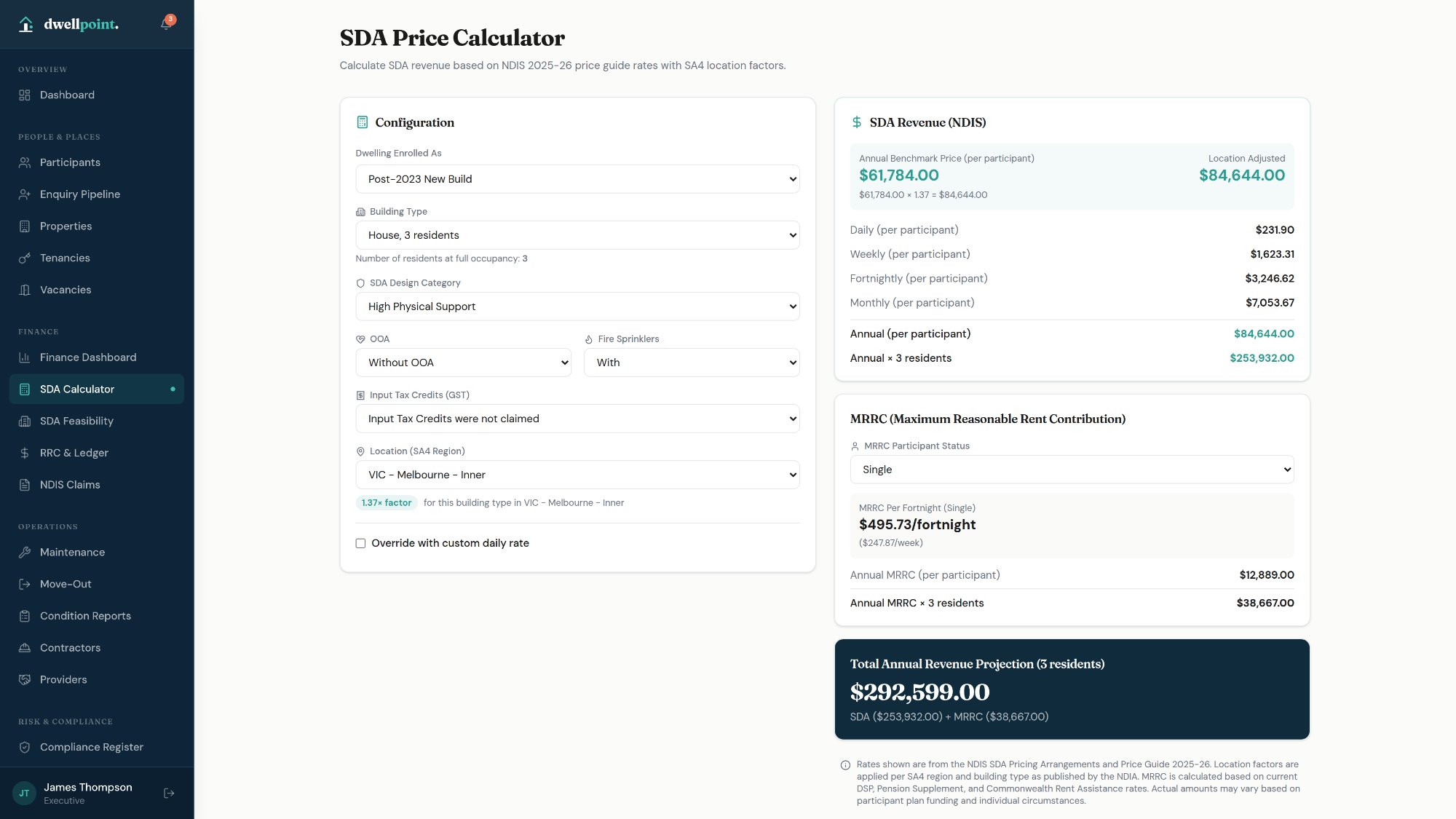
Configure rate calculations across all NDIA parameters with full rate breakdowns across every time period.

  • All enrolment types: Post-2023, Pre-2023, Existing, and Legacy Stock
  • All building types with bedroom and resident variations
  • SA4 location factors by region per building type
  • OOA and fire sprinkler toggles
  • ITC and MRRC calculations from current DSP/CRA rates
  • Daily, weekly, fortnightly, monthly, and annual rate breakdown
SDA Calculator
SDA Feasibility

Multi-dwelling feasibility modelling with PDF export.

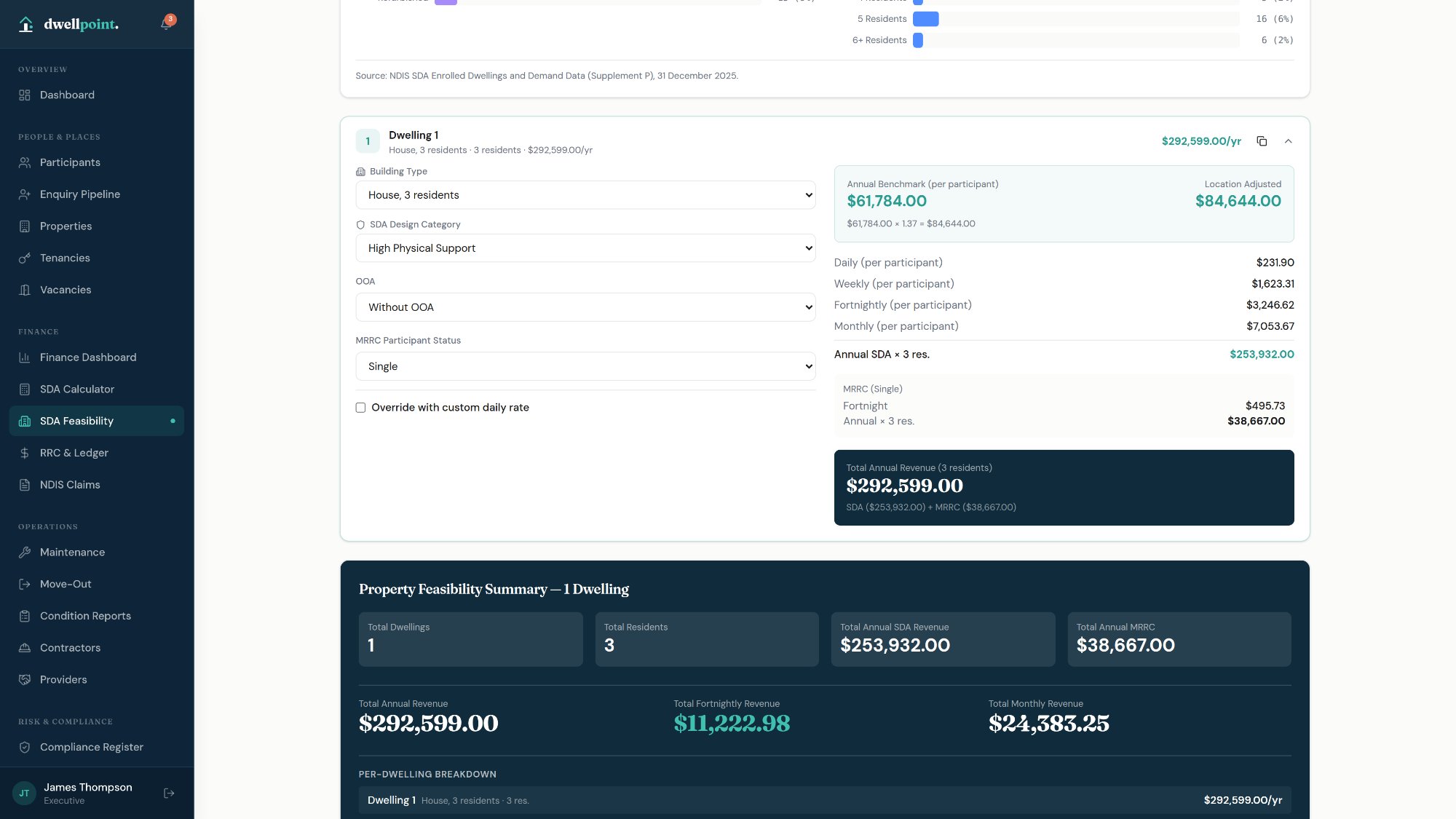
Model investment feasibility across multiple dwelling configurations — with per-dwelling breakdowns, total annual revenue projections, and a branded PDF export for presentations and board reporting.

  • Configure multiple dwellings with different building types and resident counts
  • Per-dwelling annual SDA and MRRC revenue breakdown
  • Portfolio summary: total dwellings, residents, annual SDA, and MRRC
  • Total annual, fortnightly, and monthly revenue at a glance
  • PDF export for investment analysis and board presentations
SDA Feasibility
Contractor Management

Your approved contractor directory,
insurance compliant and audit ready.

Maintain a verified register of approved contractors — organised by trade, with insurance expiry tracking, NDIS approval status, and direct SMS assignment from maintenance requests.

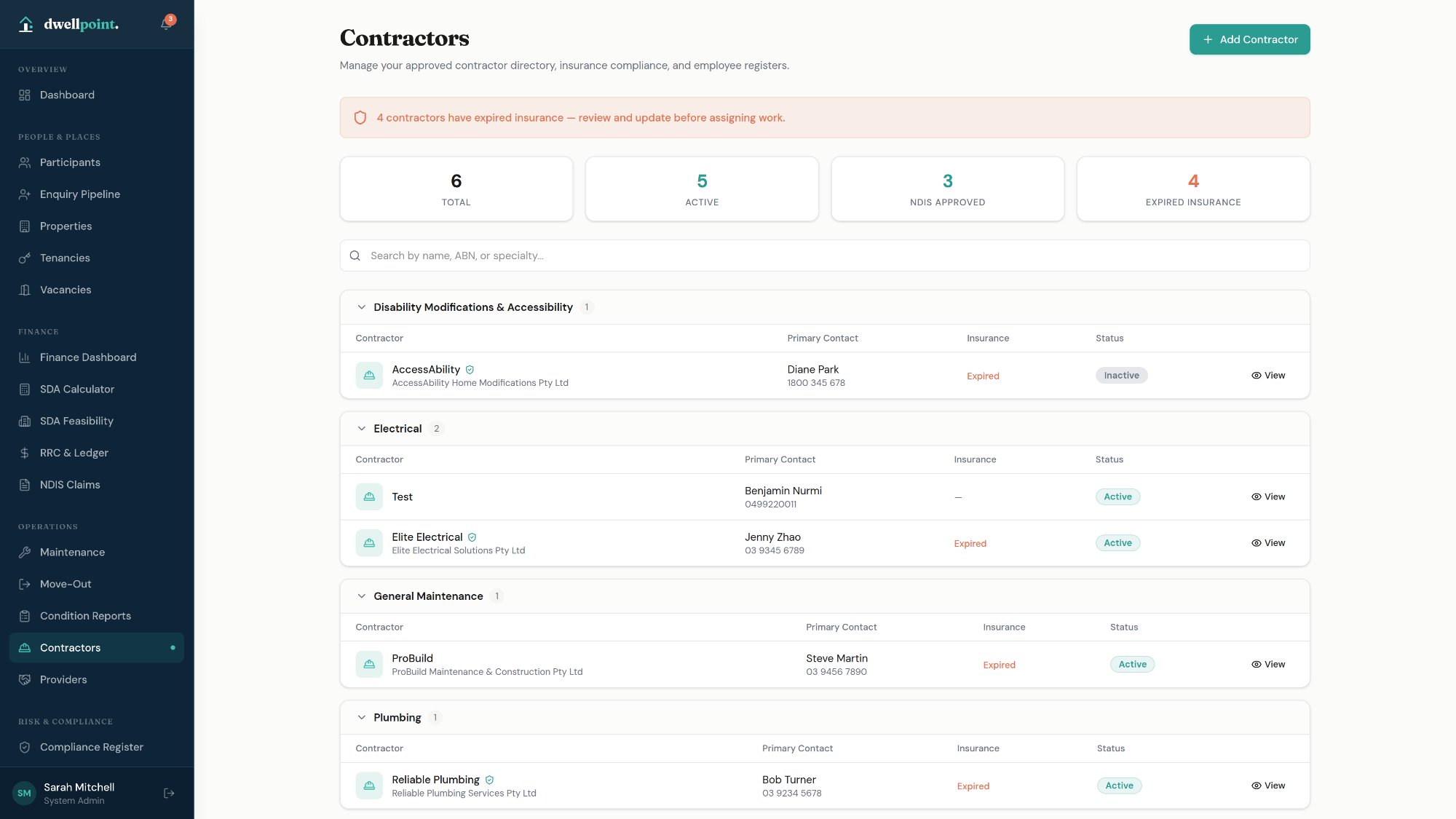
Contractors

One directory. Every trade. Always up to date.

Contractors are grouped by specialty — from electrical and plumbing through to disability modifications and general maintenance — with insurance compliance tracked and surfaced as alerts before work is assigned.

  • Contractor register grouped by trade specialty
  • NDIS approval status per contractor
  • Insurance expiry tracking with expired insurance alerts on the dashboard
  • Primary contact, ABN, and licence details per contractor
  • Active / inactive status with search by name, ABN, or specialty
  • Direct SMS notifications to contractors from maintenance requests
  • Contractor cards linked to assigned maintenance jobs
Contractor register
Provider Management

Partner provider relationships,
organised and visible.

Manage your relationships with support providers — from NDIS registration details through to staff inductions, participant connections, and incident contacts — all in one place.

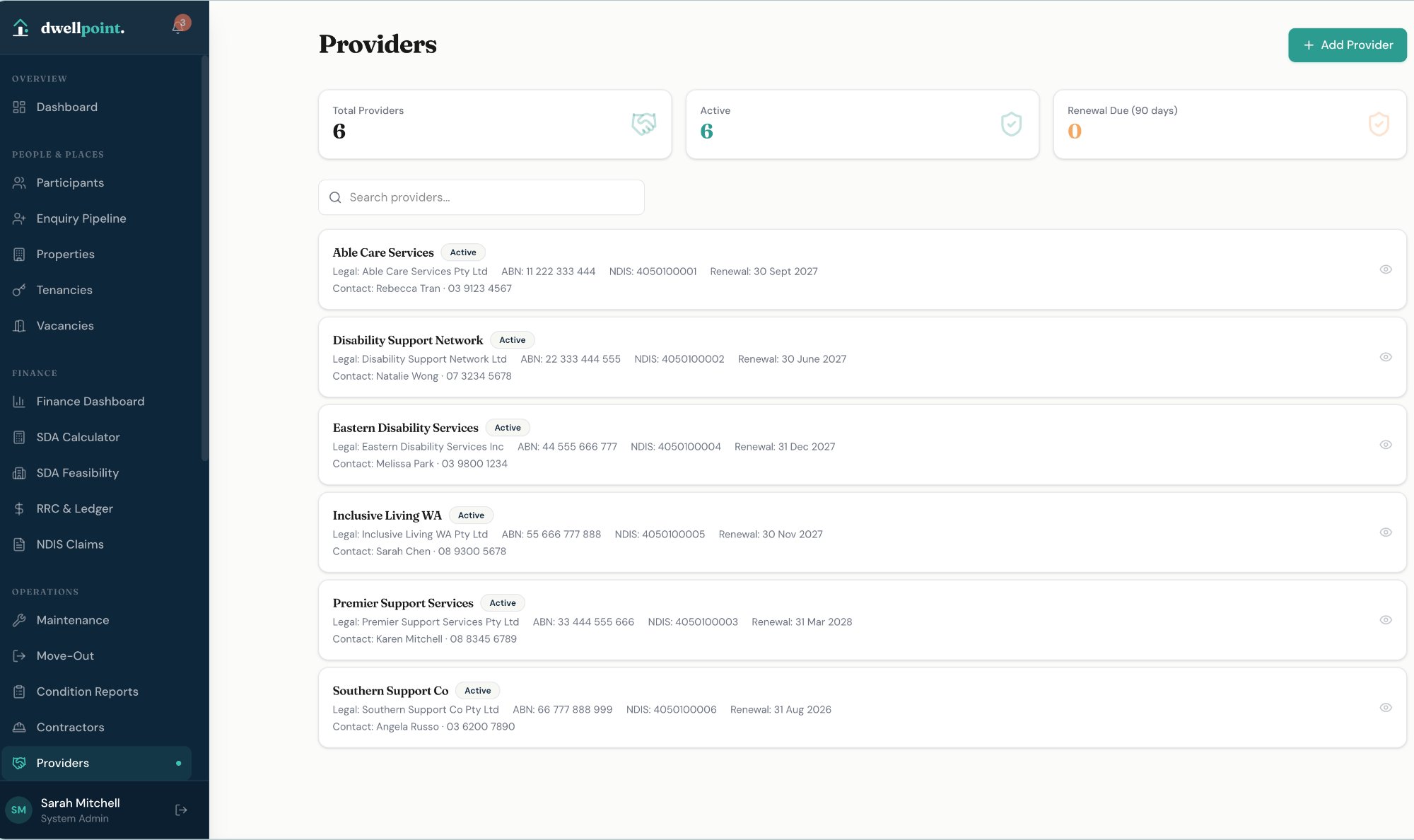
Providers

A complete register of every partner provider.

Track all support providers your organisation works with — ABN, NDIS registration, classes of support, renewal dates, and primary contacts — with active/inactive status and renewal alerts built in.

  • Provider register with ABN, ACN, NDIS registration number, and renewal date
  • Classes of support classification per provider
  • Active provider count and renewal due (90 days) summary at a glance
  • Primary contact, director, and reportable incident contact per organisation
  • Full search across all providers by name, ABN, or contact
Providers list
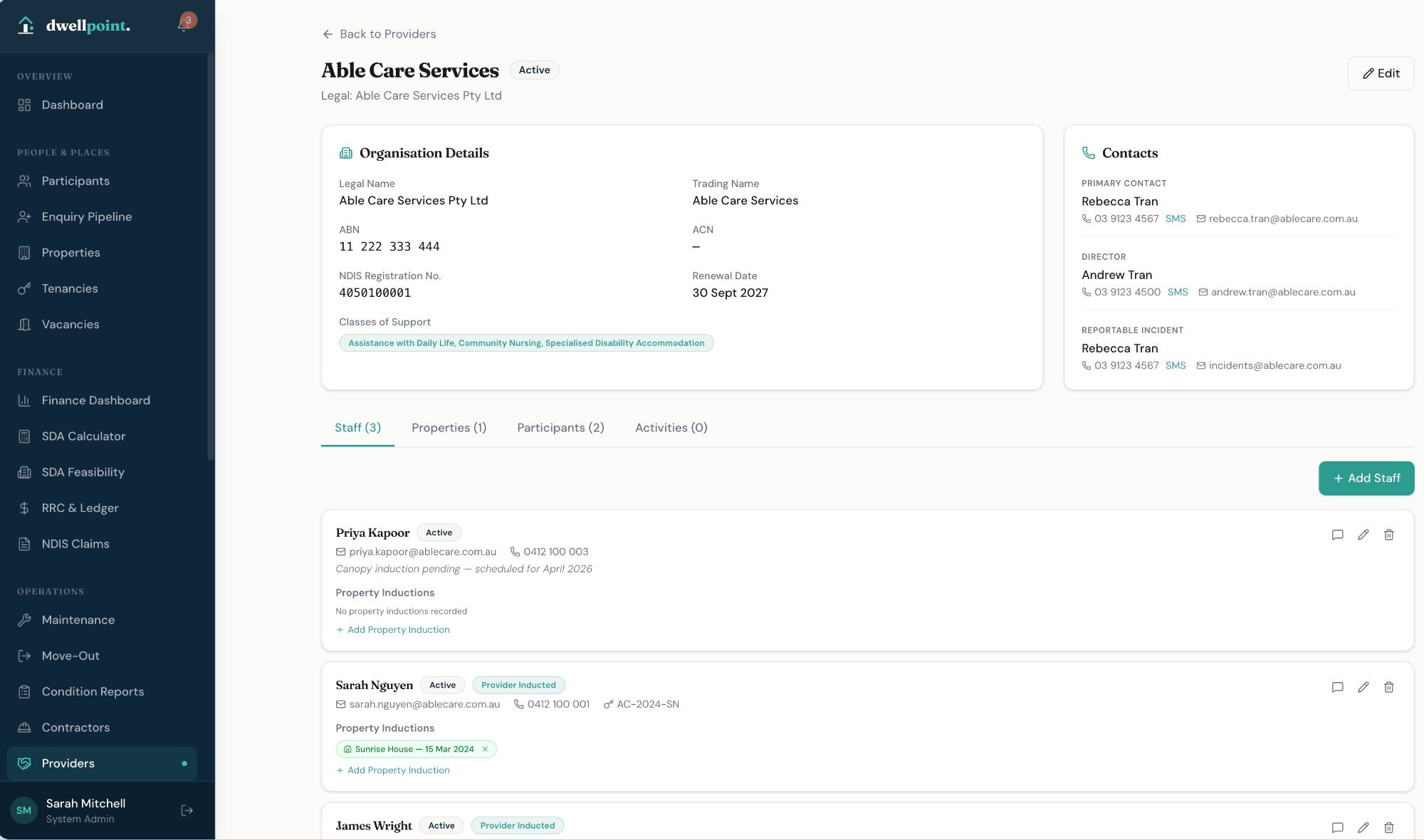
Providers

Staff, participants, properties, and contacts — one provider view.

Each provider record surfaces the full operational picture — organisation details, staff with induction status, linked properties, supported participants, and designated incident contacts — without switching screens.

  • Staff register per provider with active/inactive status and induction tracking
  • Property inductions recorded per staff member with completion dates
  • Linked participants and properties shown under each provider
  • Reportable incident contact captured separately from primary contact
  • Direct SMS and email available from every contact record
  • Activity log tracking all provider interactions and updates
Provider detail

Reports & Analytics

Portfolio performance, visible at a glance.

Across occupancy, arrears, claims, maintenance, and compliance — dwellpoint turns operational data into structured reports you can act on, export, or share.

Reporting

Multiple report views. One export.

The Reports & Analytics module gives you a real-time overview of your portfolio across five structured tabs — with a Portfolio PDF export and full data export available from any view.

  • Overview — portfolio occupancy rate, outstanding arrears total, total claims value, and occupancy chart by property
  • Arrears Ageing — outstanding MRRC balances by participant with ageing buckets
  • Claims Reconciliation — claimed vs paid vs pending across NDIS claims
  • Maintenance — open, urgent, and completed maintenance tasks across properties
  • Compliance — overdue, upcoming, and completed tasks by property
  • Portfolio PDF export and Export All Data available from any tab
Reports & Analytics
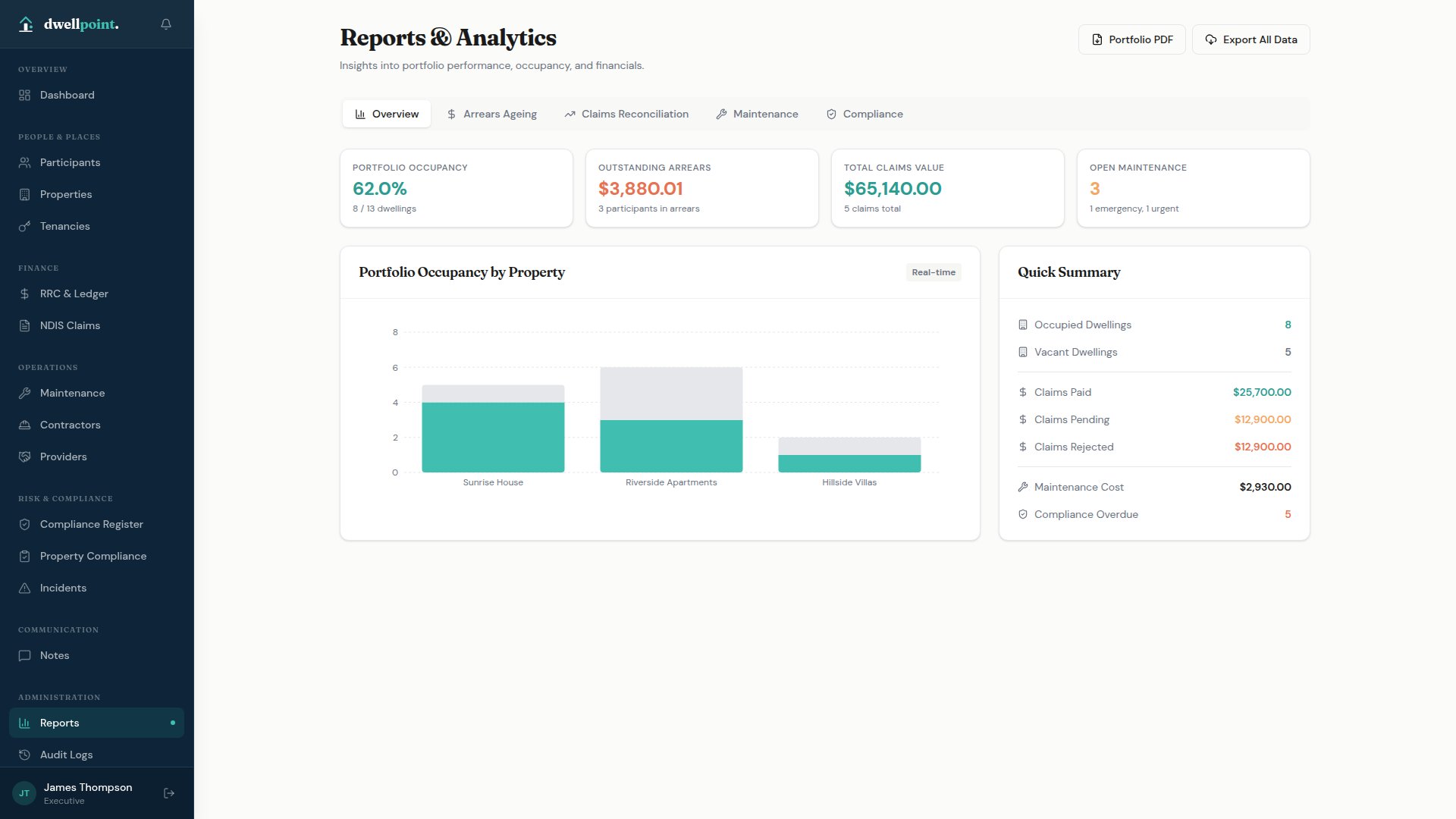
Reporting

Portfolio occupancy and financial performance, at a glance.

The Overview tab surfaces your most critical metrics in real time — occupancy by property, arrears totals, claims value, and open maintenance — alongside a Quick Summary panel for instant financial visibility.

  • Portfolio occupancy rate with occupied vs vacant dwelling counts
  • Outstanding arrears total with participant count in arrears
  • Total claims value across all submitted claims
  • Open maintenance count with emergency and urgent breakdown
  • Occupancy bar chart by property — real-time
  • Quick Summary: claims paid, pending, rejected, maintenance cost, compliance overdue
Reports Overview
All Modules

Eleven integrated modules,
one operational system.

Every module is designed for SDA operations — not adapted from generic software. Each one connects to the others so your data flows without duplication.

Participants
Full lifecycle management — NDIS funding profiles, tenancy, support networks, and onboarding checklists.
Property & Tenancies
Property register, multi-dwelling management, tenancy lifecycle, vacancy tracking, and occupancy reporting.
RRC & Ledgers
Automatic RRC calculation and invoice generation per NDIS guidelines, with payment tracking and arrears management.
NDIS Claims
SDA claim preparation, validation, and tracking — from draft through to payment, with PRODA integration.
Maintenance
Six-step maintenance workflow with SLA tracking, contractor SMS notifications, work order generation, and cost management.
Compliance
Property compliance registers with templates, scheduling, document expiry alerts, and per-property dashboards.
Incident Management
NDIS Q&S compliant incident reporting across eight sections, with investigation workflow and PDF export.
Risk Assessment
L×C risk scoring with 5×5 matrix, controls management, incident-linked risk scores, and review scheduling.
SDA Calculator
Official NDIA 2025–26 SDA pricing with all enrolment types, building types, SA4 location factors, and feasibility modelling.
Providers
Partner provider register with staff inductions, participant links, incident contacts, and NDIS registration tracking.
Reporting
Finance dashboards, maintenance analytics, compliance tracking, and branded PDF export across all modules.
Platform-wide
Role-based access control across 9 configurable roles. Full audit trail, SMS & email notifications, Australian data hosting, mobile responsive, and in-app Help Centre.
9 Roles Full Audit Trail SMS + Email AU Data Mobile Ready Help Centre
Access Control

Nine configurable roles.
Everyone sees what they need.

Role-based access control means each team member sees only what's relevant to their function — from executive reporting through to contractor-level maintenance access.

System Administrator
Operations Manager
Tenancy Manager
Property Manager
Support Coordinator
Finance Officer
Compliance Officer
Maintenance Coordinator
Executive
Sign Up for Early Access

Purpose-built for SDA providers.
Join the early access list.

dwellpoint. is currently in early access. Register your interest and we'll be in touch to discuss your organisation's requirements and arrange a demonstration.

Phone
02 59 4DWELL +61 2 5943 9355
Email
hi@dwellpoint.au We'll respond within one business day
Address
81–83 Campbell Street
Surry Hills NSW 2010